Draft legal documents 10× faster — right in Word
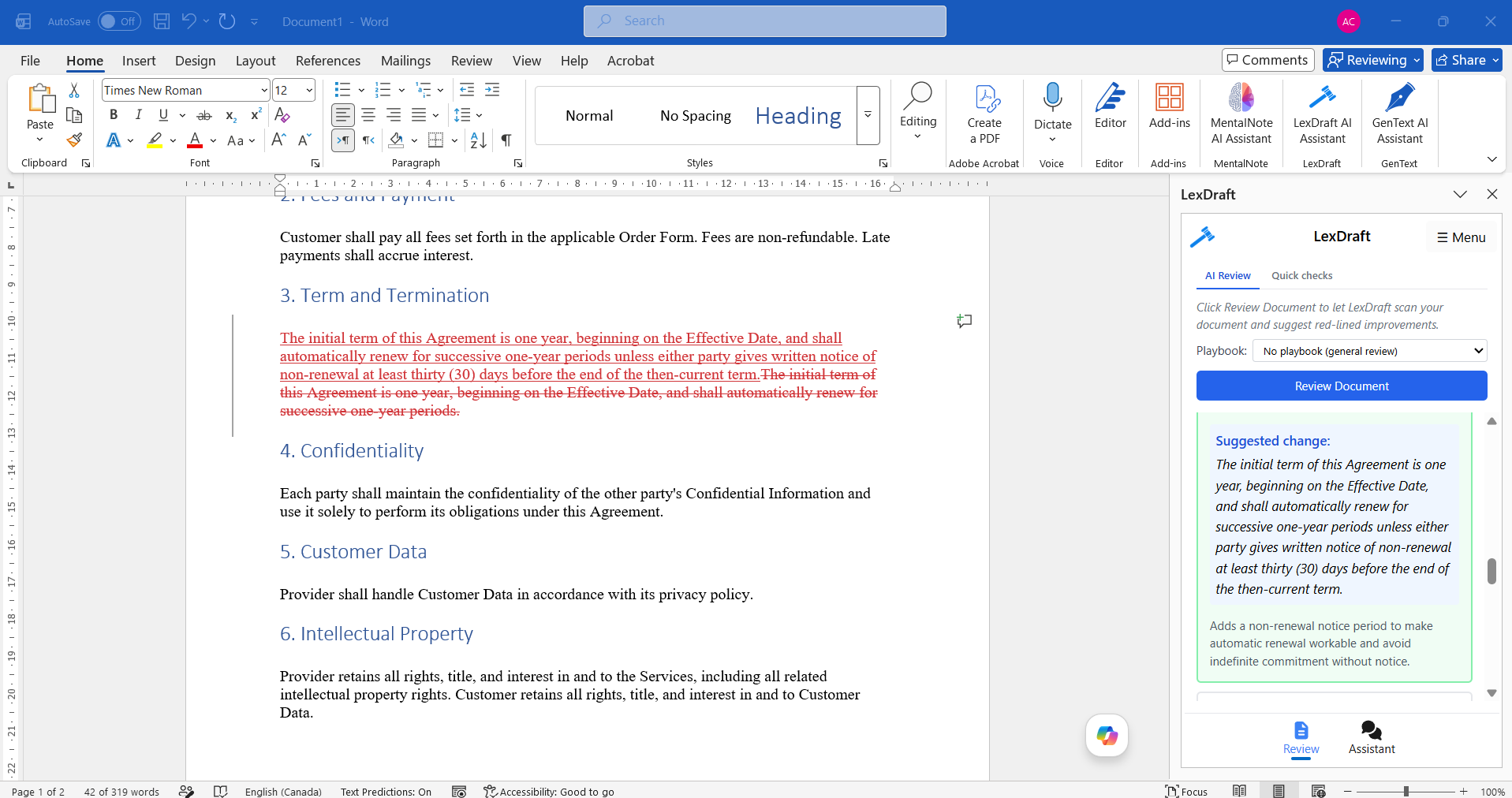
NDAs, employment agreements, service contracts, and more. Jurisdiction-aware AI drafts a first version in under 60 seconds, so you can focus on the clauses that matter.
Four powerful features, all in the free tier
Surgical word-level edits, attorney-authored playbooks, instant defined-term and cross-reference checks, and verified case-law citations — all live in the Microsoft Word add-in.
Surgical edits
Word-level red-lines that change the exact 4 words you need — not the whole paragraph. Your formatting and surrounding clauses stay untouched.
Playbooks (4 built-in)
Pick a playbook — Mutual NDA, SaaS MSA, DPA, Services Agreement — and LexDraft applies its attorney-authored rules during review. Catch missing clauses you'd otherwise scroll past.
Quick checks (no AI)
Instant regex-based scans for defined-term drift and broken cross-references. Catches the "Section 5.3" → "Section 5.4 (deleted)" errors a busy reader skims over.
Verified case-law citations
Ask LexDraft for precedent and every citation comes with a ✓ verified badge — cross-checked against CourtListener so a hallucinated case never ends up in your brief.
Trusted by legal teams at
Stop copy-pasting from old docs. Start drafting from intent.
LexDraft turns a one-line prompt into a well-structured, jurisdiction-aware legal document — directly inside Microsoft Word. No new app to learn, no upload required.
Draft in 60 seconds
Type what you need ("Consulting agreement for a California SaaS startup, 6-month term, $150/hr") and LexDraft produces a complete first draft.
Jurisdiction-aware
Select your state or country once; LexDraft adjusts non-compete scope, notice periods, arbitration venue, and governing-law language automatically.
Built around confidentiality
No document retention after a session. End-to-end TLS encryption in transit. Your drafts never train another model.
6+ agreement types
NDAs, employment, consulting, service, lease, and partnership agreements — each with industry-specific clause libraries.
AI review & redline
Paste a third-party contract; LexDraft flags missing terms, risky clauses, and suggests tracked-change redlines you can accept or reject.
Plain-English summaries
Every clause gets a one-sentence plain-English summary in the margin — perfect for explaining a draft to a non-legal stakeholder.
Trusted by 2,000+ legal professionals
Solo practitioners, in-house counsel, and legal-ops teams use LexDraft to cut hours of routine drafting from every week.
"I draft about 40 NDAs a quarter for a small startup roster. LexDraft cut that work from a full afternoon to about 30 minutes. The jurisdiction-aware non-compete handling is what sold me — it actually knows California is different."
Marcus T.
Solo Practitioner · Bay Area, CA
"We used to keep an internal clause library in a shared Word doc. LexDraft's clause library is better organized, jurisdiction-tagged, and the AI redline catches drift between drafts. Saved us from rolling our own legal-tech tool."
Priya S.
Director of Legal Ops · SaaS · 250 employees
"As an in-house counsel at a fintech, I was skeptical of AI-assisted drafting because of confidentiality. LexDraft's no-retention policy let our InfoSec team approve it quickly. The plain-English clause summaries are great for explaining drafts to product leads."
Daniel K.
Senior Counsel · Fintech · NYC
Built for legal-grade trust
GDPR Ready
No Doc Retention
Encrypted In Transit & At Rest
Microsoft AppSource Verified
Three steps to your first draft
Install from Microsoft Marketplace
Free Word add-in. Installs in under a minute. Works in Word 365, 2021, and Word on the web.
Describe your document
Type your intent in plain English. LexDraft asks a few clarifying questions about jurisdiction, parties, and key terms.
Review and refine
A complete draft appears in Word. Edit inline, use AI redline on any clause, then save or share.
Common questions, straight answers
Is LexDraft secure enough for client-confidential work?
LexDraft uses end-to-end TLS encryption in transit, does not retain your documents after a session, and never trains AI models on your drafts. The security posture is built around no-retention and minimum data collection — your contents are processed in-session and then gone.
Does LexDraft replace my lawyer?
No. LexDraft accelerates first-draft creation and surfaces standard clauses, but the final review of any legal document should be done by a qualified attorney for your jurisdiction. Many of our customers are attorneys themselves who use LexDraft to cut hours of repetitive drafting on routine agreements.
Which Microsoft Word versions are supported?
LexDraft works in Microsoft Word 365 (Windows and Mac), Word 2021 and later desktop versions, and Word on the web. Installation is free from Microsoft AppSource and takes under a minute. The add-in appears as a side panel in your Word ribbon.
Is the free tier really free?
Yes — the free tier includes 2,000 generated words per month, which is roughly 3 to 5 NDAs or 1 to 2 longer agreements. No credit card required to install. Upgrade to Professional ($99/month or $990/year — 15% off annual) only when you need higher monthly volume or AI redline review.
Can LexDraft handle non-US jurisdictions?
Yes. LexDraft drafts under United States law — federal plus all 50 states and D.C. Jurisdiction-aware features adjust governing law, notice periods, non-compete enforceability, and arbitration venue automatically. International jurisdiction support is on our roadmap.
What makes LexDraft different from other AI legal tools?
LexDraft is built around four things: (1) it runs natively inside Microsoft Word — no upload, no separate platform; (2) it has a real free tier with no credit card; (3) it produces surgical, word-level red-line edits rather than whole-paragraph rewrites; and (4) every case-law citation is verified against CourtListener so hallucinated cases never reach your brief. See our Compare page for detailed side-by-side breakdowns with other tools.
What's included in the Enterprise plan?
Enterprise customers get unlimited monthly word usage, SSO sign-on, audit logs, dedicated support, and an annual contract. Contact our sales team for pricing and to discuss compliance requirements specific to your firm.
Popular templates
By matter type
Compare LexDraft to
Cut legal drafting time by 10×
Free tier covers 3–5 NDAs per month. No credit card required.
Install LexDraft — Free ForeverWorks in Microsoft Word. 2,000 words/month free.
Free 50-Clause Contract Review Checklist
Get our printable PDF — every clause to flag in NDAs, MSAs, employment agreements, and SaaS contracts. Built by working contract lawyers.
No spam. Unsubscribe in one click. Privacy.
Sent! Check your inbox.
The checklist should land within 2 minutes. Add support@lexdraft.ai to your contacts so it doesn't get filtered.