Everything you need to draft contracts faster
LexDraft runs entirely inside Microsoft Word. No browser tab to switch to, no upload, no new app to learn. Just better drafts, faster.
Install Free in WordFour new features, all in the free tier
Surgical edits, playbook-driven review, quick consistency checks, and verified case-law citations — all working in the Microsoft Word add-in you already use.
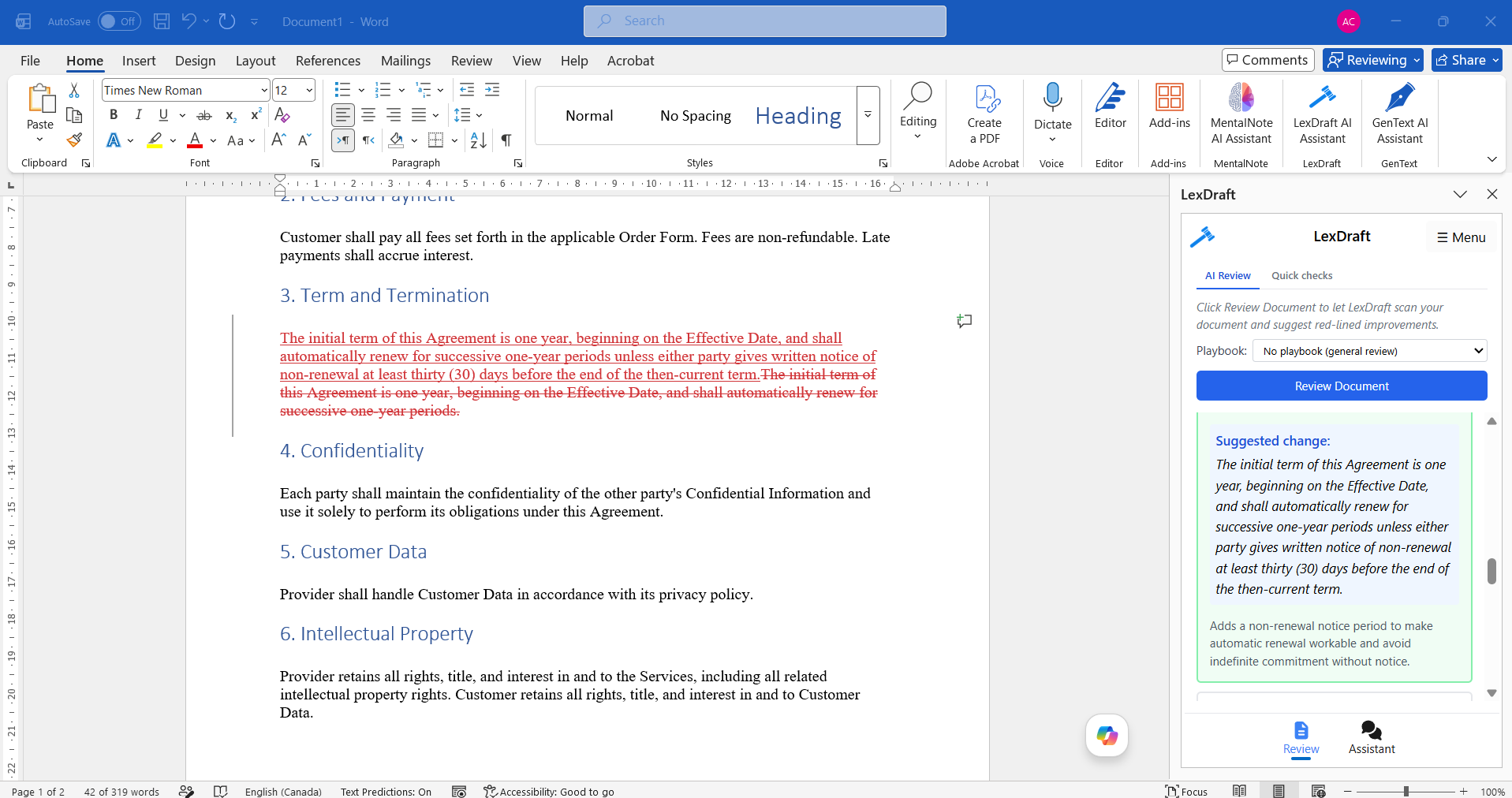
Surgical edits
Word-level red-lines that change the exact 3-12 words you need. Formatting and surrounding clauses stay intact.
Playbooks
Four attorney-authored playbooks — NDA, SaaS MSA, DPA, Services — inject specific review rules into every scan.
Quick checks
Instant regex scans for defined-term drift and broken cross-references. Single-digit milliseconds, no AI cost.
Verified citations
Citation results can be cross-checked against CourtListener. Qualified counsel must verify each authority and the proposition it supports before use.
Detail: how each of these works under the hood
Surgical edits
Context-anchored find/replace handles multiple occurrences of the same phrase. One-click accept produces a native Word tracked change. Falls back to whole-paragraph rewrite when the model can't find a clean span. Severity-graded Critical/High/Medium/Low for one-glance filtering.
Playbooks
Each available playbook contains specific checks, such as "Is the limitation of liability capped at 12 months of fees?" Rules guide the review prompt. Confirm any required playbook during the design-partner pilot.
Quick checks
Defined-term check finds Title-Case phrases used without a definition (or defined but never used). Cross-reference check validates every "Section 5.3" / "Exhibit B" / "Schedule 1" resolves to an existing target. Each finding has a "📍 Take me there" jump.
Verified citations
Cross-checked against the CourtListener public-records database (4.2 million US opinions). Citations render as cards in the Assistant pane with case name, citation, year, and ✓/⚠ verification status. US federal + state appellate decisions for now; UK/Commonwealth on the roadmap.
From intent to a first draft in Word
Describe your document in plain English. LexDraft asks a few clarifying questions about parties, jurisdiction, and key terms, then produces a complete first draft directly into your Word document.
- 6+ document types: NDA, employment, consulting, service, lease, partnership agreement
- Industry-specific clause libraries (SaaS, healthcare, real estate, construction, finance)
- Conversational refinement — ask "make the non-compete 6 months instead of 12" and the draft updates
- All output is editable Word text — no forms, no exports
AI Drafting
Jurisdiction-Aware
Built for your state. All 50 of them.
Select your jurisdiction once; LexDraft adjusts every clause that matters — non-compete scope, notice periods, governing law, venue, and enforceability language.
- US federal + all 50 states and D.C.
- State-specific non-compete, notice, and venue rules
- Automatic flagging of clauses unenforceable in the selected state
- International jurisdictions on the roadmap
Paste the counterparty's draft. Get tracked-change redlines back.
Stop reading third-party contracts line-by-line. LexDraft reviews them for missing standard terms, risky clauses, and jurisdiction-specific red flags — then proposes redlines you accept or reject inline.
- Risk-scored clause analysis (low, medium, high)
- Standard-term gap detection (missing indemnity, weak IP assignment, etc.)
- Proposed redlines as native Word tracked changes
- Side-by-side comparison against your firm's standard templates
AI Redline
On-demand Explanations
Ask for a plain-English explanation
Use the LexDraft chat in Word to ask about a clause or legal concept when you need another way to understand it. Explanations are AI-generated and should be checked by qualified counsel.
- Available on demand in the Word sidebar
- Ask follow-up questions in the same chat
- Review and verify before relying on the answer
Built around confidentiality
Your drafts are sensitive. Document context and model responses may be held in a short-lived service cache while you use the add-in and expire after roughly 60 minutes of inactivity. Customer documents are not used to train models.
- Short-lived service cache that expires after inactivity
- TLS 1.2+ encryption in transit
- AES-256 at rest for account metadata
- No training on customer content — ever
- Security requirements confirmed during pilot
- Microsoft AppSource verified
Short-lived Service Cache
Try every feature free
Every feature above is available on the free tier, up to 5,000 words/month. No credit card.
Install LexDraft — Free ForeverCommon questions about LexDraft
How does LexDraft integrate with Microsoft Word?
LexDraft is a native Word add-in available from Microsoft AppSource. Once installed, it appears as a side panel in your Word ribbon. There's no upload, no browser tab, no copy-paste between apps. Output goes directly into your active Word document as editable text. Works in Word 365 (Windows and Mac), Word 2021, and Word on the web.
What document types can LexDraft draft?
LexDraft includes workflows for NDAs, employment agreements, consulting agreements, service agreements, lease agreements, and partnership agreements. Verify your intended document type and clause requirements during a design-partner pilot.
How accurate is LexDraft's AI redline?
LexDraft's AI redline can flag missing terms, conflicting clauses, ambiguous definitions, and risky standard terms based on model analysis. It can miss issues or be wrong. Qualified counsel must review and verify every output before use.
Does LexDraft handle non-English documents?
LexDraft currently generates English-language drafts. Evaluate the current product on that basis rather than relying on roadmap features.
Can LexDraft replace my legal team?
No. LexDraft can accelerate routine drafting and review work. Complex strategic work — negotiation, deal structuring, regulatory analysis, and litigation — still requires qualified attorneys.
Is there a free trial or freemium?
Yes. The Free plan covers 5,000 generated words per month — roughly 3 to 5 NDAs or 1 to 2 longer agreements. No credit card required to install. You can upgrade to Professional ($99/month or $990/year — 100,000 words/month) or Enterprise ($199/month or $1,990/year — unlimited words) when you need higher volume.
Free 50-Clause Contract Review Checklist
Get our printable PDF — every clause to flag in NDAs, MSAs, employment agreements, and SaaS contracts. Built by working contract lawyers.
No spam. Unsubscribe in one click. Privacy.
Sent! Check your inbox.
The checklist should land within 2 minutes. Add support@lexdraft.ai to your contacts so it doesn't get filtered.